IndiaResults.com Punjab Board 10th Result 2026 Name wise- The Punjab School Education Board (PSEB) has announced the Matriculation Examination Result March 2026 on 11th May 2026 at 12:30 PM. The PSEB 10th Toppers List 2026 Pdf, overall pass percentage, and result statistics will be released along with the result.
Over 2.84 lakh students are waiting for the PSEB Class 10th Result Marksheet 2026 pdf, which will be available at www.pseb.ac.in and www.indiaresults.com. The students need to enter the Roll no. or Name to chec the result online.
As per the Official PSEB 10th Date Sheet 2026 pdf, the authorities conducted the annual examination from 6th March 2026 to 1st April 2026.
PSEB 10th Result 2026 Date & Time
The Punjab School Education Board (PSEB) has officially announced that the PSEB Class 10 Result 2026 will be declared on 11 May 2026 at 12:30 PM. Students will be able to check their marks online through the official website after the press conference.
PSEB Matric Result 2026 Highlights
| State Board | Punjab |
| Exam Name | PSEB Class 10 Examination 2026 |
| Conducting Board | Punjab School Education Board |
| Exam Dates | 6 March to 1 April 2026 |
| Result Date | 11 May 2026 |
| Result Time | 12:30 PM |
| Official Website | www.pseb.ac.in |
| Credentials Required | Roll No. or Name |
| Result Mode | Online |
Official websites to check the PSEB 10th Result 2026
- www.pseb.ac.in
- https://www.pseb.ac.in/results
- www.indiaresults.com
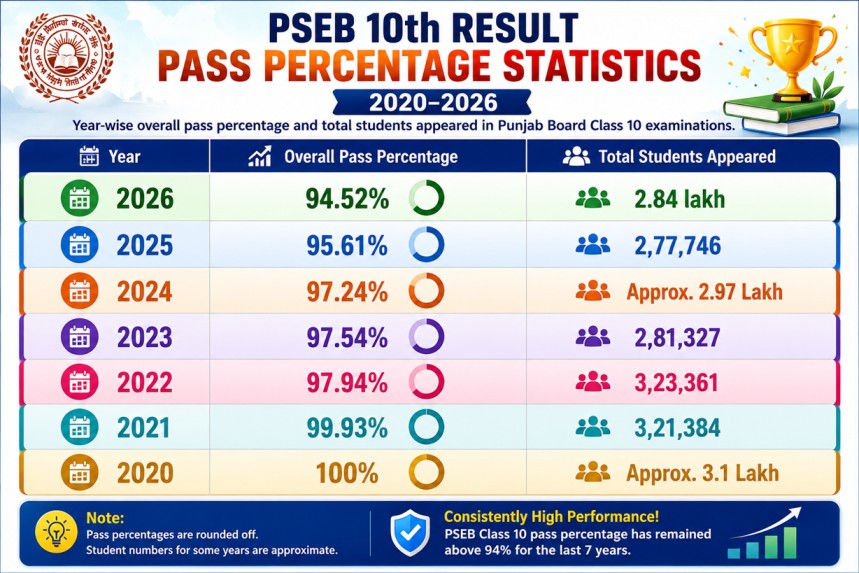
Previous Trends of Overall Pass Percentage
| Year | Overall Pass Percentage | Total Students Appeared |
|---|---|---|
| 2026 | 94.52% | 2.84 lakh |
| 2025 | 95.61% | 2,77,746 |
| 2024 | 97.24% | Approx. 2.97 Lakh |
| 2023 | 97.54% | 2,81,327 |
| 2022 | 97.94% | 3,23,361 |
| 2021 | 99.93% | 3,21,384 |
| 2020 | 100% | Approx. 3.1 Lakh |
Steps to Check PSEB 10th Result 2026 on pseb.ac.in
- Visit the official website of the Punjab Board: www.pseb.ac.in
- Click on the “Results” section available on the homepage.
- Select “Matriculation Examination Result 2026” or “PSEB 10th Result 2026” link.
- Enter your Roll Number or Name as mentioned on the admit card.
- Click on the Submit button.
- Your Punjab Board 10th Result 2026 will appear on the screen.
- Download and take a printout of the provisional marksheet for future use.
How to Check Punjab Board 10th Result 2026 on IndiaResults.com?
Students can also check their Punjab Board Class 10 Result 2026 through the IndiaResults portal by following these simple steps:
- Visit the official IndiaResults website: www.indiaresults.com or https://punjab.indiaresults.com.
- On the homepage, select the state Punjab.
- Click on the link for “PSEB 10th Result 2026” or “Punjab Board Matric Result 2026”.
- Enter your Roll Number or Name in the required field.
- Click on the Submit button.
- Your Punjab Board Class 10 Result 2026 will appear on the screen.
- Download the scorecard and take a printout for future reference.
Details Mentioned on Punjab Board 10th Marksheet 2026
The online marks memo of the PSEB 10th Result 2026 will include the following details:
- Student’s Name
- Roll Number
- Registration Number
- Father’s Name
- Mother’s Name
- School Name
- Subject-wise Marks
- Practical Marks
- Total Marks Obtained
- Grade/Division
- Result Status (Pass/Fail)
Students are advised to verify all details carefully after downloading the marksheet.
What After PSEB 10th Result 2026?
After checking the Punjab Board 10th Result 2026, students should collect their original marksheet and passing certificate from their respective schools. Candidates who qualify in the matric examination will become eligible for admission into Class 11 streams including Science, Commerce, and Arts.
Students who are not satisfied with their marks may also apply for rechecking or revaluation once the board releases the official notification.
Important Links
| Details | Link |
|---|---|
| Punjab Board Official Website | Visit Here |
| PSEB 10th Result 2026 | Check Result |
| IndiaResults Portal | Click Here |